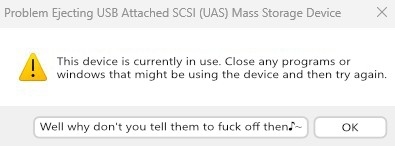

I don’t fucking know why I can’t eject USB hard drives. I installed the SysInternals apps, and best they can tell me is that Dropbox is fucking with the drives. I explicitly told Dropbox to not fuck with USB drives. I don’t know who’s lying, I just want whoever is fucking with the drives to stop fucking with the drives, OK??? OK.
Windows has that button, but only if you right-click the drive in file explorer and select “eject”. The dialog is very similar, but has the option to continue anyways. That option doesn’t appear when ejecting from the taskbar.
Which is weird, because it means that Microsoft went out of their way to make two different, almost identical dialogs. And they made the better one harder to reach.
Either that or they were added at different times by two different teams with two different design philosophies.
It’s definitely that one
yeah a fresh windows 11 install has like 20 different control panels, all built at different times by different teams using different UI toolkits. It’s basically their philosophy to not unify anything but instead just keep bolting new things to different pieces of the OS, no matter how similar
Reminds me of that story about Windows’s format dialog. It’s on Xitter, so here’s the text:
Dave W Plummer
I wrote [Windows’s] Format dialog back on a rainy Thursday morning at Microsoft in late 1994, I think it was.
We were porting the bajillion lines of code from the Windows95 user interface over to NT, and Format was just one of those areas where WindowsNT was different enough from Windows95 that we had to come up with some custom UI.
I got out a piece of paper and wrote down all the options and choices you could make with respect to formatting a disk, like filesystem, label, cluster size, compression, encryption, and so on.
Then I busted out VC++2.0 and used the Resource Editor to lay out a simple vertical stack of all the choices you had to make, in the approximate order you had to make. It wasn’t elegant, but it would do until the elegant UI arrived.
That was some 30 years ago, and the dialog is still my temporary one from that Thursday morning, so be careful about checking in “temporary” solutions!
I also had to decide how much “cluster slack” would be too much, and that wound up constraining the format size of a FAT volume to 32GB. That limit was also an arbitrary choice that morning, and one that has stuck with us as a permanent side effect.
So remember… there are no “temporary” checkins :)
Someone told me recently that “everything temporary is permanent as long as it works good enough” or something like that.

Not 99%. Windows has many usability issues. I’d vote for “dont steal focus and stick windows in front of where I’m typing” and “don’t move things just as I go to click on them” for a start, and also “don’t somehow take an hour to delete 50 files.”
“Fun” fact: if you think it’s slow normally (and to be fair, it is), NTFS seems to have a pathological performance regression when a directory contains more than 10,000 children, any operations on files in that directory slow down by around 95%.
I discovered this on our CCTV system at work (that runs on Windows Server 2022), which creates an inordinate number of small files (each containing at most a few seconds of video). It was causing some of its periodic maintenance tasks to fail, as they’d take longer to run than than the configured interval between them.
Windows also really doesn’t like dealing with half-petabyte filesystems, just like… at all.