I’m currently on PopOS 22 and I’m in the mood to try something different. I mostly game but I do need my system to have support for the everyday tasks I sometimes need to do, so I fell bazzite is a no go.
I see a lot of people recommending Cachy, will it be a smooth experience for someone used to linux? Is Endeavour a better choice? Will I have issued with my PS3 eye camera and x52 stick?
I only use EndeavourOS and don’t speak by experience for CachyOS. While EndevaourOS is a more traditional Archlinux with some additional tools and GUI elements, and some branding, Cachy is a more optimized OS trying to squeezing out performance. I feel like EndeavourOS is a bit more minimal, bit more CLI oriented and is closer to original Archlinux. CachyOS is a bit more opinionated, has strong focus on performance optimizations and may come with a bit more pre-selected applications for a head start. At least this is my impression I get.
I game a lot on my EndeavourOS and its well suited for that case. On the other side, CachyOS will may have an edge on this point and is also well suited for everyday tasks.
Lot of people will recommend Cachy, because of the performance optimizations they do. These are metrics you can compare directly with benchmarks and “proof it scientifically”. However all the other differences are not that scientific to put into words and often are a taste and philosophy difference. Therefore I can’t say which one is better (even if I tested Cachy too). They just have different focus, building on the same foundation.
Cachyos is very user friendly. I moved from popos and love it.
100% of endeavor is using command line pacman for all your application installs and updates. They are like base arch with a wizard for installing. I installed them once in a work system and tried them for half a day before saying to myself “this isn’t worth it.”
Both are using arch, but cachyos has a much better curated set of bins for gaming for people who don’t want to pick and choose what things do what and really dig deep into custom repos and modules.
Cachyos has been rock solid for me too. Highly recommend limine for a bootloader with a btrfs partition so you can have btrfs snapshots that are easily recoverable (other loaders work, limine is just what I see recommended the most for it for some reason, I think I use systemd-boot for mine.)
Cachyos has a wiki with an install guide as well as a gaming section I highly recommend following.
Pop os bins are so out of date, I gained substantial performance and all the games I really had to fuck with to get working on pop 22/24 just fucking worked- no joke- on cachy. You don’t need to constantly update your proton versions either, cachyos keeps their one up to date as part of the distro and it’s already there in steam as an option if you install the gaming packages they have prepared with gamemode and other things.
You can’t just copy your home folder over. Arch does things differently than pop/ubuntu. You can however move over stuff to your new user folder bit by bit. My Firefox config went over and even kept my signed in sessions.
Anywho, your call on which to go with.
Thanks for the reply! I always nuke the main drive whenever reinstalling anyway so the home folder is not a problem. I guess since you did the same switch as I’m thinking of (and yes, PopOS gave me some headaches I never imagined I’d have in this day and age) I’ll probably follow your recommendation.
Pop 24 pissed me off so much that I had to do a distro swap. Cosmic has a lot left to work on to be usable for me. Too many headaches.
Bin wise, stuff like mesa 25.1.5 not even supporting fsr4 on a nearly year old 9070xt was enough for me to be like “what am I even doing here?” - cachyos may not have yesterdays nightly mesa build but it does have 25.3.x from very recent. Everything is way ahead of pop. I’m about a month in on just smashing update and praying, but so far zero issues. I even have HDR and VRR working!
Pop was my first Linux distro for gaming. I intended to try it for 6mo-year or so before trying another because I am very patient and learning to troubleshoot things is fun. By the end of three months I had so many things I wanted to install or update and so many of them were in their repos or they had old versions. I upgraded to and tried 24 for another month or so before the jump.
My theory is that Pop accrued a shit ton of technical debt moving to cosmic and it shows. They clearly are continuing to build stuff out and doing bug fixes like crazy but they are at the bottom of a hole and they need to dig themselves out. This hole is gonna take their whole team way longer than a year to get out of imo. When they finally do, maybe then cosmic will be the DE of our dreams. It sure was a fast de, but it also has barebones features. I need to see how it performs once the features are closer to parity with all these very mature 20+yo DEs, but that may take a while.
100% of endeavor is using command line pacman for all your application installs and updates.
This is not accurate by the way. It ships with its own Discovery app store too. I primarily use pacman/yay but some apps I use from Discovery that are installed as flatpaks. You could likely flip that and install most everything that way, it’s just not my preference.
Interesting, they don’t list it under package management.
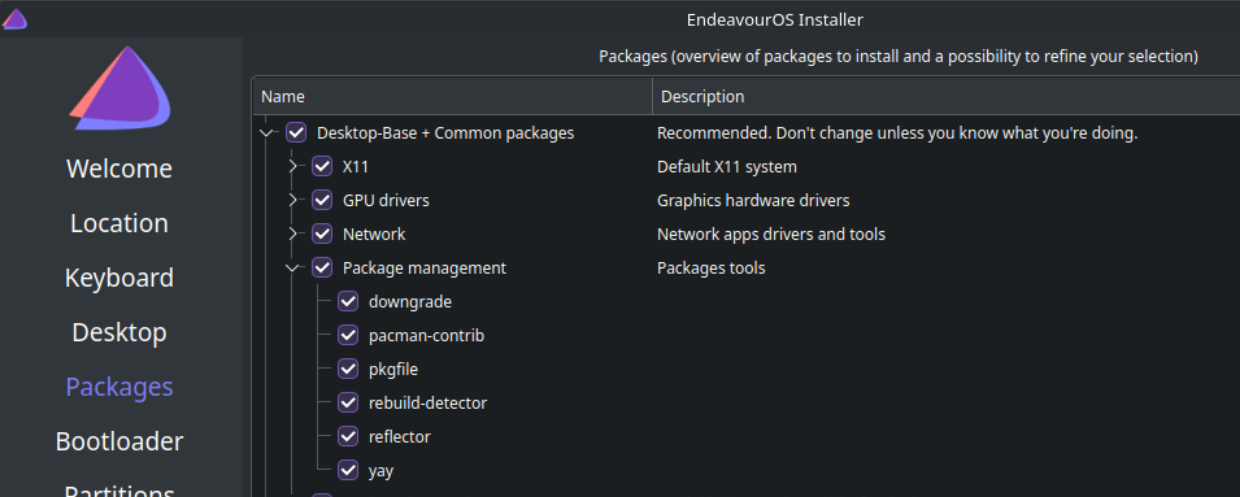
Reinstalling with xfce this time to see how it looks. I swore all I had was pacman / yay.
I’m not sure, but they might be talking about Discover, the Plasma software installer. It doesn’t manage arch packages but can be used for flatpaks.
Yeah, I got my vm up and running to try it out. Because i’m on xfce I don’t even have that by default. For a second I thought I was crazy though lol.
They could install octopi or that one other alternative for a pacman gui, same as cachy has preinstalled. It’s fairly barebones though.
CachyOS has cachy-update which is still a terminal window for updates but has a tray config and will be there to let you know when stuff changes. I don’t remember where I saw it though, the updater tray wasn’t default.
eos-update seems similar on the surface and they have eos-update-notifier for a tray update notifier. After installing the thing though it’s anything but the same. It’s very user-unfriendly compared to cachy-update. I shouldn’t have to dig for a man page to configure an application with a gui presence (tray icon) imo but i’m being nitpicky.
Sorry, I misspoke; Discover is part of the KDE suite which makes sense considering I use Plasma. And when selecting Plasma as my DM, it did come installed by default.
It is recommended not to install packages from Discover that aren’t flatpaks for an Arch based system.
The main difference is cachy has their own repos that contain packages optimized for more modern cpus, although they are optional they could potentially be a speed improvement.
Having tried both i would say cachyos is probably better for gaming and a bit more noob friendly but only slightly.
Daily driving EndeavourOS for over a year, game daily with no issues. Command line updating isn’t a big deal, just
sudo pacman -Syu && yay -SyuAlias it or use a terminal like quake that disappears. If you want yay to just do it’s packages use -Sua instead.
My PS5 controller worked out of the box.
If you do
yay -Syuanyway, then you don’t needpacman, asyayis a wrapper aroundpacman. On EndeavourOS there is a special command to update the systemeos-update. It is a wrapper aroundpacmanand supportsyayas well (so it can handle AUR). I also have some other stuff like Flatpak and Rust environment to update, so created an alias to bundle all of that. Here is my update commands:alias update='eos-update --yay' alias updates='eos-update --yay ; flatpak update ; flatpak uninstall --unused ; rustup self update ; rustup update'You should check out topgrade - it does all of those things as well. Not specifically for EndeavourOS, it can be used pretty much everywhere.
Its pretty handy, particularly if you have multiple machines to keep updated (it has a remote command too).
Why would I need a third party application, if I can do the thing with an alias? I prefer to workout what I need and only do that and write my own scripts in case it gets complicated. That’s how I do stuff. :D
Sure, its not up to me to decide what you use. Was just a suggestion that others might find handy if they don’t want to write and maintain scripts.
I’ve been running EOS for a couple of years now and love it. Everything works, however my PS5 controller always struggles on Bluetooth unless I downgrade to bluez 5.68. They never have fixed it.
Bazzite is fine as a daily driver, just sayin.
Maybe it is, but almost every time someone does anything other than game they usually are steered away from it.
well it depends, what else would you do? browsing? gaming is the focus of bazzite but aside from that it is just immutable fedora
Mostly programming (when my day job hasn’t drained me of all the energy) and the usual stuff you’d only really do on a desktop and not on a phone, like documents, light image editing and spreadsheets, nothing fancy.
i program on bazzite-dx just fine no issues, in fact a lot of people dev on immutables because it encourages you to create proper containers for your code
deleted by creator
arch is dogshit 👼 yeah i wanna have shit randomly break on my computer that i need to do work on, yeah i wanna have to read a blog to make sure i dont update to the next version because people were having black screen issues 🙄
have fun
betaALPHA testing linux for people that have serious work to do i guessdeleted by creator
I’ve been daily driving CachyOS for probably a year or two now? And it’s been pretty solid for just about everything.
It doesn’t feel like Arch as much to me. A gui package manager, easy-to-use optimized packages, and most things working easily out of the box make it feel more like Mint without all the extra default applications (which I prefer). There’s lots of room to tinker, but I don’t do much of that, and it runs great.
I mostly game but I do need my system to have support for the everyday tasks I sometimes need to do, so I fell bazzite is a no go.
I wouldn’t recommend either, personally. Bazzite, however, is a top recommendation. What makes you think it’s not suitable for “everyday tasks”?
I have the same question. I game, write code, browse the internet and all sorts on Bazzite. (I actually moved from Pop to Bazzite because I couldn’t get my storage hdd to mount and stay that way on Pop (I am a Linux n00b, in case that wasn’t obvious. ))
Not too many people talk about this for some reason but Bazzite includes a bunch of stuff that just makes using Linux so much easier. They include a bunch of handy Gnome extensions out of the box. Fractional scaling is pre-configured and automatically applied. Bazaar is installed OOTB, which is so so so much better than Gnome software. Updates are handled in the background automatically. And most of all is the ujust commands, where they basically simplify many processes by breaking them down to a single command, like installing Waydroid or Resolve or Decky.
Well I was using bazzite with KDE before due to those issues with GNOME but reading all that makes me wanna check out bazzite with GNOME
Agreed. I used and really enjoyed Endeavour back when I was happy spending time tinkering with my system, but these days I just want to either get on with work or game, and Bazzite/Bluefin/Aurora are ideal for this.
I was under the impression that their aggressive pruning of things usually used for workstation tasks would hamper a sane use of it. From what I’ve gathered they even removed the usual python bins that come with most linux distros these days, as an example.
I don’t know what any of that means but I haven’t encountered anything that prevents me from using it on my workstation. Sounds like you may have a more advanced usecase.
Universal Blue does things differently from traditional distros and their philosophy is very cloud/container based.
They specifically have the Bluefin variant for workstation and software development use:
I’ve been running EndeavourOS on my server for about 3 years, and on desktop for about 18 months. My DE is KDE plasma which is perfect for me, being similar to windows but customisable.
You can deploy the CachyOS performance tweaks and kernel to EndeavourOS if you fancy best of both. (See the CachyOS install guide).
Personally I prefer the barebones of EOS to something that has already made software choices for me.
I have tried both Endeavour and Cachy, and I feel no real difference.
I used KDE Plasma on both and the experience is so similar, so I would say go with the one you feel for.
I chose Cachy due to it being new and popular.
I used Endeavor for a long time, then out of curiosity I put CachyOS on my laptop. On CachyOS, games seem to have been a shade faster, but that’s it. The updates got stuck after a while, the system kept running into some errors during the update process. Not to mention that after a while I always ran out of storage space on the hard drive, I had to manually delete the limine+btrfs backups, even though it was set that the last four could be max on the vinyon. So I switched from CachyOS back to Endeavor. I like the command line and its minimalism better.
I’m planning on installing CachyOS on my desktop and the main reason for me is so I can have easily snapper snapshots set up with btrfs and limine.
having used cachy and bazzite before I can tell you both work fine for daily browsing/gaming/programming
but after actually reading the last line of your post I would recommend cachy, looks like you will need to install very specific drivers for those peripherals and you will have an easier time doing so in cachy than bazzite
How comfortable are you using the terminal to install and update your apps? EndevourOS and (I think) CachyOS do not have a GUI software store to pick your apps from. You typically install software using pacman or yay. They are great options if you’re comfortable with it. But if you’re new to Linux or just want to stick with GUI tools, then I’d stay with PopOS or Bazzite or Linux Mint or something like that.
CachyOS comes with a GUI package manager by default
I don’t really mind at this point, if I’m installing from a package repo of some sorts I prefer using the terminal anyway. It’s mostly if I’m downloading something from the browser that I’d like to be able to just double click, but it’s not a big deal anyway.
I liked the Endeavour defaults and post-install wizard better tbh
It really comes down to how much you want already set up. Archinstall = base system with DE / Endeavour = base system with helpful scripts / Cachyos = Full System
All of them work. How much work you want to put in and how close you want to stay to Vanilla.